Current AVD Setup Architecture
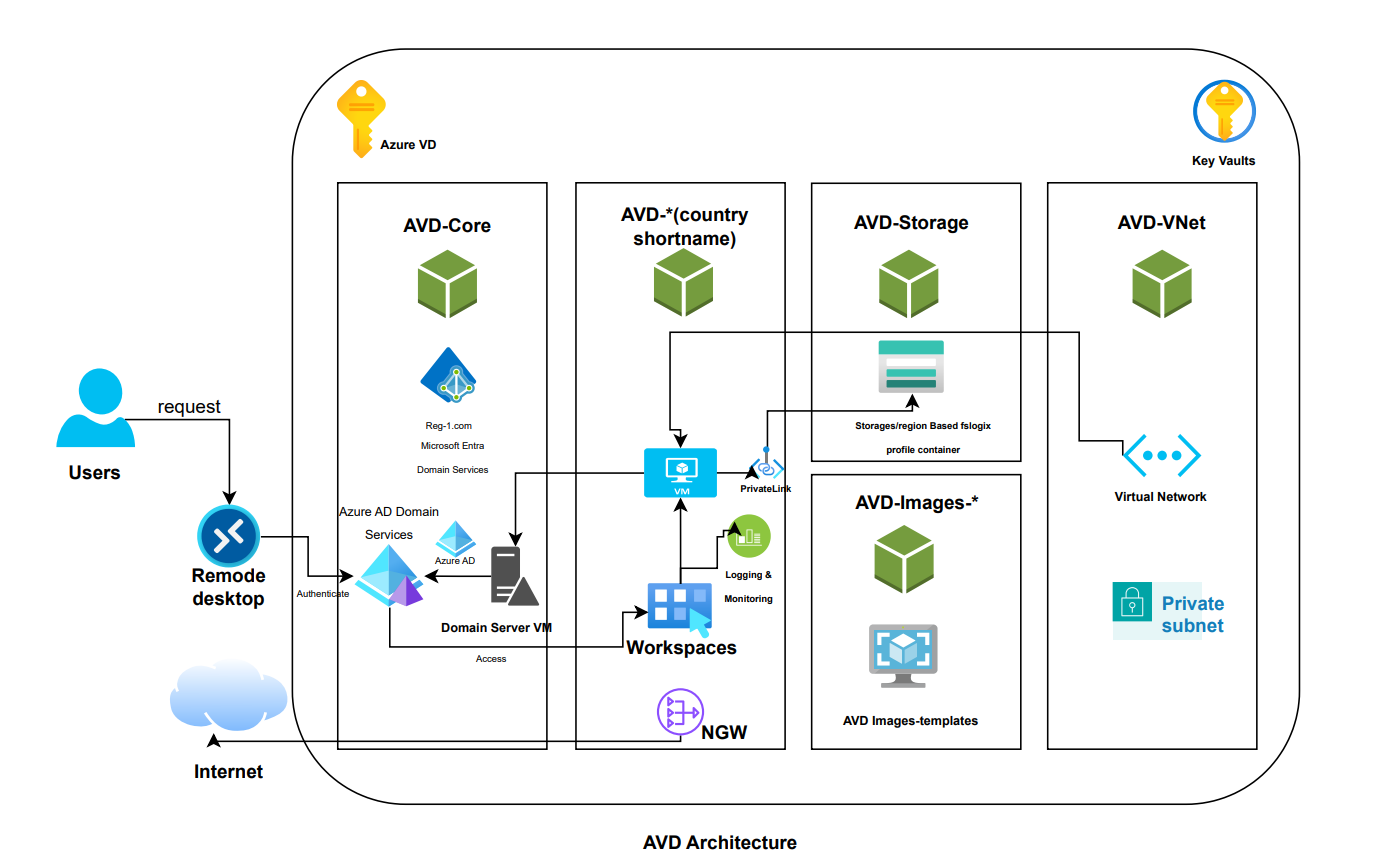
The core of the AVD solution is in the resource group called AVD-Core.
It contains the AADDS, which is an azure service that covers the creation and management of a Domain Controller. In this case, it was created for the reg-1.com domain.
What this done is it created a different kind of Active Directory (The one commonly used on prem for company networking and user/computer management).
What we have then done is made a core Virtual Network (uk south based) and the IP servers that this VNet uses is the ones that we have got from the AADDS (load balancers IP). Now the devices connected to the virtual network will be able to use the AADDS for its purpose of managing users/computers on the domain.
Next, We have domain joined a VM to this AADDS, via creating a windows server vm, and domain joining the VM (there's a lot of documentation online on how to domain join VM to AADDS).
There's a few reasons for doing this but the main ones is to: administer the AADDS domain itself, by connecting as an one of the admin users (in the AADDC users group), and using Group Policy Management. Group policies have not been completely implemented and finalized as there is no ‘perfect’ set of policies to use. It can vary based on how strict/flexible you want the users to be able to use the VMs.
Next, I have created a storage account and file share which I enabled to be using private link. The purpose of this file share is for the FSLogix profiles. There is more official documentation on FSLogix and how it can be used with Azure file share and AADDS setup. Anyhow that setup was done between the file share and the domain.
Next there are the VM images, each image was built on the base image of Windows-11 multi-session with O365 applications.
!!! NOTE:the multi-session image MUST be used with an FSLogix setup. But even single session sessions can use FSLogix for storing user profiles as it decouples the user profile from the VM itself and allows for backup of the users data/files without caring about the VM. It also allows a user to login to one vm one day, and a different vm the next day whilst still having exactly the same files.
Going back to the images, each image has installed the required software for the developers as well as the FSLogix application itself, We just downloaded it from official fslogix place and run the short and easy setup using the guide. After this there are multiple options to point it to the correct fileshare. You can either specify in the group policies, or directly on the image by editing the registry values. In this case we have set these settings on the registry, however they are better off to be set on the GPOs also. It doesn’t matter if they are duplicated as the GPO’s overwrite/control the registry editor to begin with.
We have a new VNET for the Philippines and Nepal side, as we have implemented the VMs for that region also because it would provide better latency and best experience. This involves doing a VNET peering to the main UK Vnet where the AADDS is and also setting the DNS of the VNET to point to the IP’s of the AADDS load balancers, as mentioned above and done for the intial VNET.
We have also repeated the steps of making the fileshare and the images for the Nepal and Philippines, as when we deploy to the host pools, we can only use one region and not mix regions, hence the individual resources/components per region. The only thing that is not duplicated was the AADDS as this is the core of the solution. It is also not affected by cross region and can communicate with the cross region VNets no problem.
Curently we have 4 hostpool namely
- NEPAL-HOSTPOOL
- PHILIPPINES-HOSTPOOL
- UK-DEV-HOSTPOOL
- UK-HOSTPOOL
In above 4 hostpool except UK-HOSTPOOL all three hostpool are used and provisioned for respective developer. and UK-HOSTPOOL is used by non-dev. All these Hostpool are provisioned on respective resource group.
AVD-UK Resource Group contains:
- UK-DEV-HOSTPOOL
- contains two vm which is domain joined and each vm have maximum 2 multi session user connection defined.
- UK-HOSTPOOL
- contains two vm which is domain joined and each vm have maximum 2 multi session user connection defined.
- AVD-UK-NGW: NAT Gateway attached for outbound traffic.
AVD-Nepal Resource Group contains:
- NEPAL-HOSTPOOL
- contains two vm which is domain joined and each vm have maximum 2 multi session user limit connection defined.
- AVD-NP-NGW: NAT Gateway attached for outbound traffic
AVD-Philippines Resource Group contains:
- PHILIPPINES-HOSTPOOL
- contains two vm which is domain joined and each vm have maximum 2 multi session user limit connection defined
- AVD-PH-NGW: NAT Gateway attached for outbound traffic
Besides that we have other resources group on azure VD subscription:
AVD-VNet resource group contains:
- virtual network and subnets for NEPAL, UK, PHILIPPINES and private dns zone link.
AVD-Storage resource group contains:
- AVD-storage contains respective storage account for Hostpool fslogix profile data.
- fslogix private endpoint for respective storage account
AVD-Functions resource group contains:
- a storage account for functions
- a function app for avd shut down in case of idle connection.
AVD-Images-Nepal resource group contains:
- contains base image for avd provisioning
AVD-Images-UK resource group contains:
- contains base image for avd provisioning
AVD-Images-Philippines resource group contains:
- contains base image for avd provisioning